
Take the service call. Keep the next HVAC enquiry moving.
A no-cooling request, a maintenance question and a replacement estimate need different follow-ups. Vera answers your business line and captures what the caller needs while you are on a roof, at a condenser or travelling between jobs. You review the record and decide the next action.
For an owner-operated HVAC line, Lite includes 100 monthly minutes of receptionist intake (about 170 calls) plus 150 minutes for connected business calls at $14.99/mo. Plus costs $29.99/mo for 300 receptionist minutes (about 500 calls), 300 calling minutes and calendar booking. Each account shares its allowances across its lines.
From caller to callback
Separate a no-cooling call from a tune-up request
Illustrative intake example. The screenshot shows the app interface, not the result of this example call.
“The air conditioner runs but the house is not cooling. Do you cover my area, and can I request a service visit?”
Details to collect
- Name and confirmed callback number
- Service location
- Reported symptoms and system type, if known
- Repair, maintenance or estimate request
Your next action
Read the summary before the callback, confirm the service area and decide what inspection is needed. Keep travel time, staff capacity and parts checks in your dispatch process; an open calendar slot cannot verify them.
Set up after-hours coverage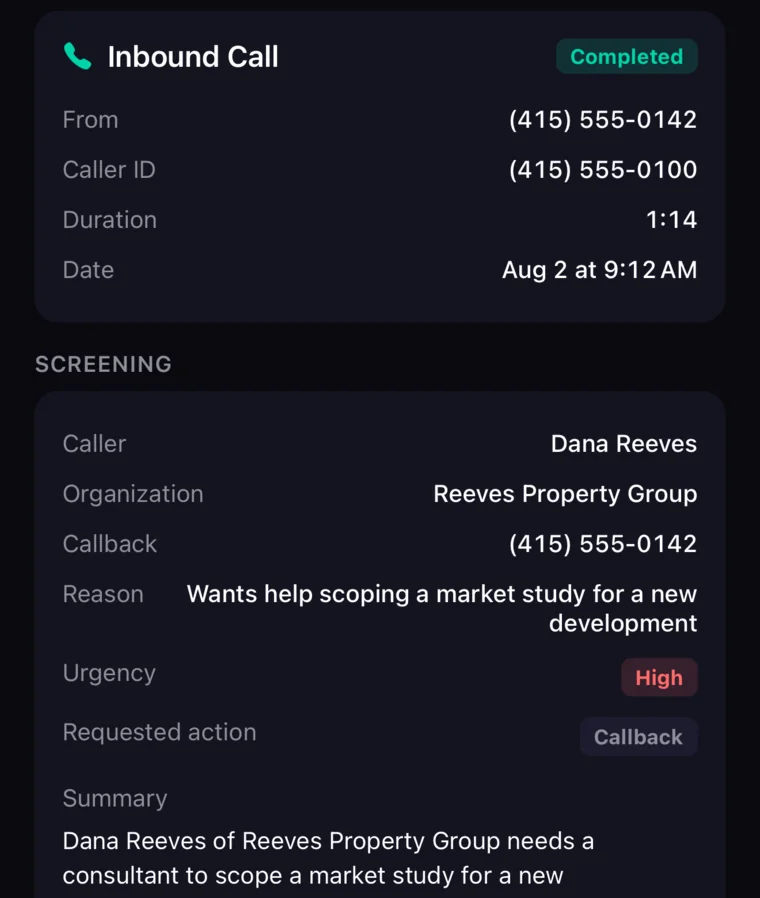
Live demo · Your business
Put Vera through a relevant call
Load the demo with the services your HVAC shop offers and the policy you use for replacement estimates. Use your browser’s Back button to return to these checks after the demo.
Play the caller
“My air conditioner is running but not cooling well. I am in your service area. Do you take repair requests, and can someone call me about availability?”
Listen for
- Listen for your HVAC business name and a clear AI introduction.
- Ask about a repair you do not offer and check the response against your profile.
- Change the callback digits mid-conversation and inspect the saved number.
- Check that availability remains a request until your stated process confirms it.
- Read the saved summary for the equipment problem and owner follow-up action.
Use fictional caller details for the test. This is a suggested evaluation, not a customer case study or a pre-recorded result.
The calls between jobs
Separate repair requests from routine scheduling
Make the callback list useful: distinguish a system failure from preventive maintenance and a future equipment purchase. The assistant needs your service policies, not a generic promise to send a technician.
Seasonal demand mixes different jobs
A caller with no cooling is different from someone requesting a tune-up. Capture the stated symptoms, system type if known, service location and callback details so you can review the request between jobs.
Replacement quotes need a site assessment
A caller may ask for the price of a heat pump or a new furnace before you have assessed the property. The assistant can explain your published estimate process and take a message; equipment sizing and a final quote stay with you.
Calendar space is not technician capacity
A free calendar slot does not prove the right technician, parts or travel time are available. Decide which appointments can be booked directly and which need your confirmation in a dispatch system.
What VeraDial handles
A receptionist on your business number
Build the profile around the questions your HVAC callers ask most: equipment you service, areas you cover, how estimates work and who confirms an appointment.
Cover calls while the app is closed
An enabled receptionist can take intake calls even when your phone is unavailable because answering happens on the server. Specify the hours when your business responds so a late-night enquiry is not mistaken for a confirmed overnight service visit.
Keep repair and maintenance requests distinct
Read the conversation record before returning a call. For a repair request, look for the stated symptom and service location; for a tune-up, look for the equipment type and requested timing. Follow up on missing facts rather than relying on an AI summary as a technical assessment.
Forward the advertised HVAC number
Your existing phone provider can remain the home of your advertised number while sending voice calls to VeraDial. Customers can continue dialing that number. Confirm the carrier’s forwarding tariff and remember that SMS to the old number still arrives with that provider.
Offer a defined estimate conversation
Vera Plus can create a 30-minute appointment in a linked Google Calendar during configured hours. That can fit an initial replacement discussion. Assigning the installer, checking stock and allowing for travel remain tasks for your field-service process.
Return calls with a separate business identity
Use the VeraDial line when following up about access or an estimate. Connected inbound calls, outbound calls and forwarding to another phone consume your calling pool. Business texting is available on eligible numbers, with carrier registration required for automated SMS.
Illustrative workflow
From HVAC enquiry to a clear next action
The following HVAC examples illustrate possible intake flows. They do not describe paying customers, completed jobs or measured revenue.
Capture a no-cooling request
Vera can collect a message while you finish the current repair. Review what the caller said, confirm the location and contact them to assess the request. Do not present the recorded symptoms as a diagnosis or a guaranteed same-day visit.
Confirm a maintenance enquiry
A customer asks whether you service their system and how a tune-up is arranged. Vera can use your published service details. You review the request and confirm technician availability in the system you already use.
Offer the next appropriate conversation
If you use Plus and have configured a suitable 30-minute Google Calendar appointment, Vera can book that conversation. A site inspection, equipment selection and installation schedule still need your approval and field-service workflow.
A useful trial follows a request from the incoming call to the record you act on. Repeat it for an unanswered owner connection, because the fallback matters as much as the greeting.
FAQ
HVAC answering-service questions
Which plan fits seasonal HVAC call volume?
Count intake minutes separately from the calls you handle yourself. Lite supplies 100 receptionist minutes (about 170 calls) for $14.99/month, alongside 150 calling minutes. If your recurring intake exceeds 100 minutes, evaluate the $29.99 Plus plan with 300 receptionist minutes and a 300-minute calling allowance. For example, 60 repair enquiries lasting two minutes each consume 120 receptionist minutes. Adding another number will not increase the shared account pools.
Will callers still use the number on my van?
They can. With carrier forwarding, callers dial the old HVAC number and their voice call reaches VeraDial. You continue paying for that original line; its SMS does not move. Test busy and unanswered routes with the carrier settings you intend to keep, including what the caller hears outside your working hours.
Is this an emergency HVAC dispatch service?
No. The receptionist supports intake and owner connection, without a staffed dispatcher or guaranteed arrival time. Your business needs its own human response arrangements for urgent work. Do not use the assistant to diagnose an equipment hazard or represent an unconfirmed service visit as dispatched.
Can it answer heat-pump or furnace pricing questions?
Add the prices and estimate rules you publish to the business profile. For a replacement that needs a property assessment, the next step should be a request for follow-up rather than a made-up equipment size, repair diagnosis or installed price. Try this exact question when evaluating the service.
Can Vera schedule several HVAC technicians?
VeraDial is built around the owner’s line. Plus booking creates 30-minute appointments in Google Calendar; it does not choose a technician or coordinate routes, jobs and parts. A multi-crew HVAC company should check its dispatch requirements first and retain its existing field-service scheduler.
What happens with long calls or a peak-day surge?
VeraDial’s receptionist has a maximum conversation duration of five minutes and a daily allowance of up to 50 answered calls on each line. Plus fair use removes the monthly receptionist-minute cap, not those operational limits. Bring your longest calls and highest-volume days to the assessment instead of relying only on a monthly average.
Is there a native ServiceTitan or Jobber connection?
Neither is a native VeraDial dispatch connector. Plus provides Zapier and signed webhooks, so evaluate the specific data and destination action your workflow requires. An integration label alone does not prove that an HVAC work order is created, assigned or updated correctly.
Try your own intake
Try an HVAC request with your own business details.
Give the demo a repair request and a replacement-estimate question. Inspect the saved details, then compare the $14.99 Lite and $29.99 Plus allowances with your busiest month. A trial has its own usage limits; check those before testing.


Hear Vera in action.
Play a short sample call, follow the transcript, and move into a personalized live demo when you're ready.